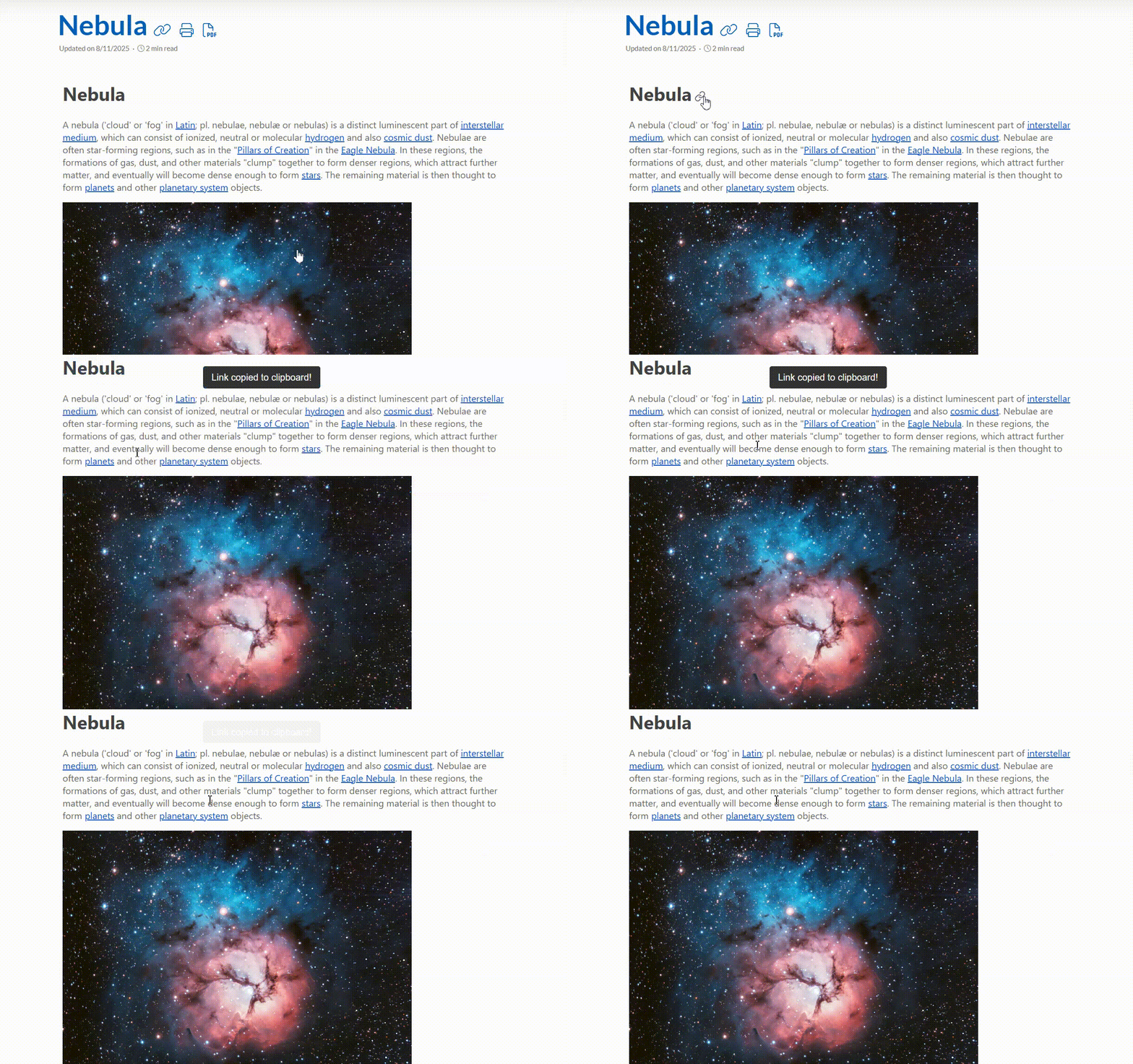
When users click a Link to this heading button in your documentation, they expect a seamless way to copy the direct URL to that section. Manually selecting and copying anchor links can be cumbersome, so automating this process improves user experience significantly.
This guide walks you through implementing a one-click anchor link copy feature using JavaScript. Here is how you can set this up:
- Navigate to your Project Settings.
- Open General → Basic Settings and locate the Project Scripts section.
- If you don’t have a script file, create one. Otherwise, open your existing script file.
- Paste the following code:JavaScript
(function() {
  function copyToClipboard(text) {
    return new Promise((resolve, reject) => {
      if (navigator.clipboard) {
        navigator.clipboard.writeText(text).then(resolve).catch(reject);
      } else {
        const textarea = document.createElement('textarea');
        textarea.value = text;
        textarea.style.position = 'fixed';
        document.body.appendChild(textarea);
        textarea.select();
        try {
          document.execCommand('copy');
          resolve();
        } catch (err) {
          reject(err);
        } finally {
          document.body.removeChild(textarea);
        }
      }
    });
  }

  function showNotification(message) {
    const notification = document.createElement('div');
    notification.textContent = message;
    notification.style.position = 'fixed';
    notification.style.bottom = '20px';
    notification.style.right = '20px';
    notification.style.backgroundColor = '#333';
    notification.style.color = '#fff';
    notification.style.padding = '10px 15px';
    notification.style.borderRadius = '4px';
    notification.style.zIndex = '9999';
    notification.style.fontFamily = 'Arial, sans-serif';
    document.body.appendChild(notification);

    setTimeout(() => {
      notification.style.opacity = '0';
      notification.style.transition = 'opacity 0.3s';
      setTimeout(() => notification.remove(), 300);
    }, 1500);
  }

  function handleHeadingLinks() {
    const links = document.querySelectorAll('a.CHHeadingLink');

    links.forEach(link => {
      if (link._processed) return;
      link._processed = true;

      const originalClick = link.onclick;

      link.onclick = function(e) {
        if (e) {
          e.preventDefault();
          e.stopPropagation();
        }

        const onclickContent = link.getAttribute('onclick') || '';
        const anchorMatch = onclickContent.match(/n\('([^']+)'/);

        if (anchorMatch && anchorMatch[1]) {
          // Set your portal's base domain here
          const BASE_DOMAIN = 'yourdomain.clickhelp.co';

          const anchor = anchorMatch[1].replace(/^!+/, '');
          const fullUrl = `https://${BASE_DOMAIN}/articles/#!${anchor}`;

          copyToClipboard(fullUrl)
            .then(() => showNotification('Link copied to clipboard!'))
            .catch(err => console.error('Copy error:', err));
        }

        if (originalClick) {
          return originalClick.call(this, e || window.event);
        }

        return false;
      };
    });
  }

  function init() {
    try {
      handleHeadingLinks();

      const observer = new MutationObserver(handleHeadingLinks);
      observer.observe(document.body, {
        childList: true,
        subtree: true
      });

      if (document.readyState === 'complete') {
        handleHeadingLinks();
      } else {
        window.addEventListener('load', handleHeadingLinks);
      }
    } catch (error) {
      console.error('Link copying script error:', error);
    }
  }

  if (document.readyState === 'loading') {
    document.addEventListener('DOMContentLoaded', init);
  } else {
    init();
  }
})();
- Replace yourdomain.clickhelp.co for the BASE_DOMAIN constant in the script with your actual domain.
- Save the script file and republish your project to apply the changes.
By implementing this script, you enhance usability by allowing users to instantly copy links to the headings. Here's the result: