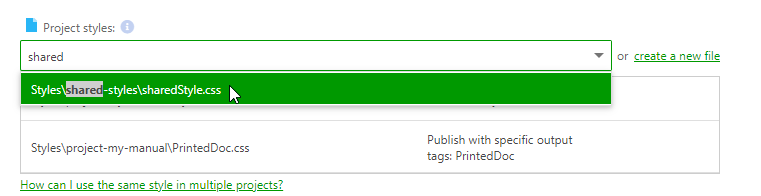
Using a single shared style file will allow you to achieve consistency throughout your documentation. You will avoid copy-pasting styles from file to file between projects and won't have to worry about keeping them in sync.
Here's how you can use a single style file in multiple projects:
- Open the File Manager from the main menu, then go to the Styles tab.
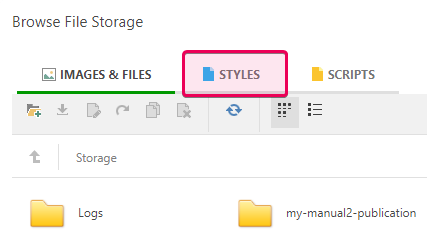
-
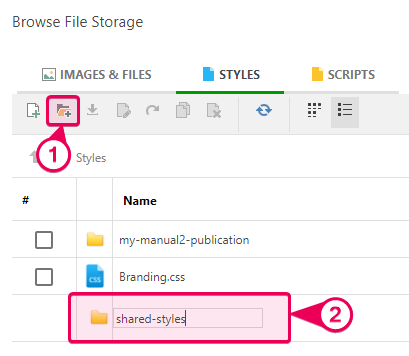
Create a new folder, "shared-styles." Open this folder.
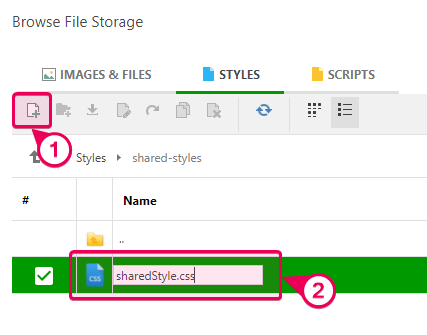
- Create a new .CSS file in this folder and name it “sharedStyle.css.”
- Open the file and fill it with the appropriate styles.
- After you've finished with the file contents, go to the Basic Settings of each project you want to apply the shared styles to and add your new .CSS file to the list of project style files.

Note Note that the lower the file is in the list, the higher its priority is. You can learn more about specificity here: Specificity - CSS: Cascading Style Sheets | MDN.