---
title: "Preparing HTML for Import"
id: "preparing-html-for-import"
project: "ClickHelp User Manual"
url: "https://docs.clickhelp.com/articles/clickhelp-user-manual/preparing-html-for-import"
updated: 2026-11-16T06:42:08Z
---
# Preparing HTML for Import
Documentation index for AI tools: [/llms.txt](/llms.txt)
This topic describes how you can prepare your source documentation project so the project hierarchy is maintained and the encoding is set up correctly after the import.
To prepare your content for importing, you must create a **.zip**archive with all the necessary files (**HTML**, **CSS**, **JS**, images). Most often, this is done automatically by the technical authoring tools.
## Archive Hierarchy
The **TOC**created by **ClickHelp**depends on the hierarchy of folders containing the **HTML**files in the archive you are importing. It means that your **TOC** can be organized differently based on the archive folders. There are two possible situations: all files are on the same level, and some files are in subfolders.
### All the HTML files on the same level
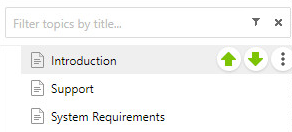
Suppose all the files reside in one folder of the archive like this:
* introduction.html
* support.html
* system-requirements.html
* upload.png
* style.css
The resulting **TOC**will have no hierarchy levels. It will look like this:
### Some of the HTML files may reside in a subfolder
Say, you have a structure like this:
* Introduction
* introduction.html
* support.html
* system-requirements.html
* upload.png
* style.css
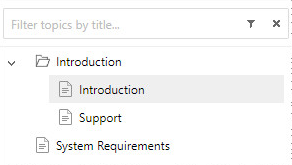
After the import, the new **Project**will have one folder-type node without a topic (which corresponds to the **Introduction**folder) with two child nodes — **Introduction**and **Support**.
If you want to create a parent node with content inside rather than having folder-type nodes without a topic, you need to rename the **HTML**file that will be used as the content source to **index.html**.
* Introduction
* index.html
* support.html
* system-requirements.html
* upload.png
* style.css
In this case, the **Introduction**node will become a topic, and its content will be taken from the **index.html** file.

## HTML Character Encoding
We strongly recommend specifying the **Character Set**in your source **HTML**files.
There are various character encodings. One and the same character can look different in different character sets. It is a general recommendation for **HTML**coders to specify the character set of their file in the file content. This can be done easily by adding a special meta tag to the **HTML**file:
* **HTML4**: <meta http-equiv="Content-Type" content="text/html;charset=ISO-8859-1">
* **HTML5**: <meta charset="UTF-8">
To learn more on HTML character sets, check this W3Schools document: [HTML Charset](https://www.w3schools.com/html/html_charset.asp).
If you see strange characters after the **HTML**or **CHM**import, this means that the character set is not specified in the source files. Specifying it will help ClickHelp process the characters correctly.
If no character set is specified, **UTF-8**is assumed by default.