ClickHelp WriteAssist is an AI companion built into the topic editor, designed to make writing and editing documents easier. It can create new topics, simplify or improve existing text, adjust tone, and fix spelling and grammar errors.
| Available with the AI Suite add-on and uses CAPs. For more information, see ClickHelp AI Suite and ClickHelp Pricing Plans. |
How to Use WriteAssist
WriteAssist is available only in the topic editor. You can access AI help in two ways:
-
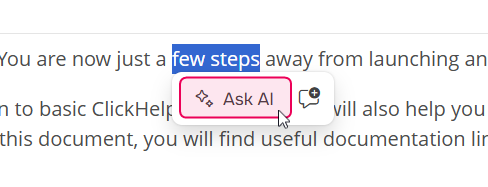
Select text and click the Ask AI button in the pop-up.
-
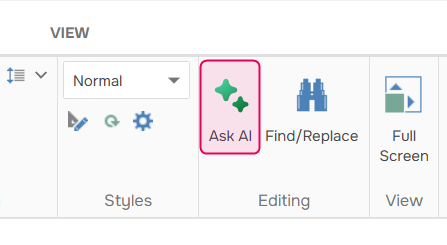
Click the Ask AI button on the Home tab of the ribbon.
What WriteAssist Can Do
| WriteAssist has access to the entire topic and part of the TOC (parent, sibling, and child topics), not just the selected text. This allows it to provide more context-aware and consistent suggestions. |
- Improve writing
- Fix spelling and grammar
- Make text shorter or longer
- Change tone (for example, make the text friendlier)
WriteAssist can also summarize or explain content, find action items, and transform text between paragraphs and bullet lists.
The selected content and your query are sent to a third-party AI service. Please keep this in mind when working with sensitive information.
| AI-generated responses may be inaccurate. Always review the results before publishing. |
Usage and Limits
WriteAssist operates with the following limits:
- Up to 75,000 characters per request, including markup
- Up to 3,000 characters for a custom prompt
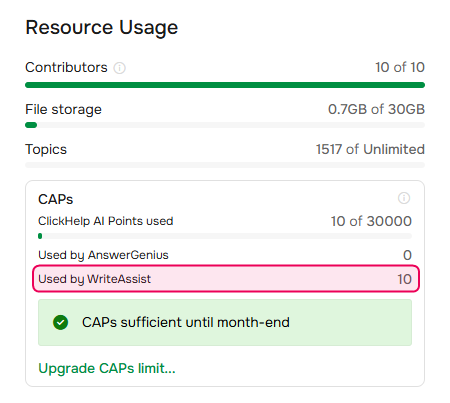
WriteAssist uses CAPs for request tracking - 10 CAPs per one request. CAPs consumption for WriteAssist and AnswerGenius is tracked separately and can be viewed on the Subscription page.