If you don't need a Home Page - for example, when you only need one online publication or want to redirect users to a specific topic, you can set up a redirect with the help of the Branding Script.
Branding Script - this is a small JavaScript file that will load on any page a reader opens.
How to Implement
-
You can create a new branding script file in your portal settings (Tools → Portal Settings in the top menu):
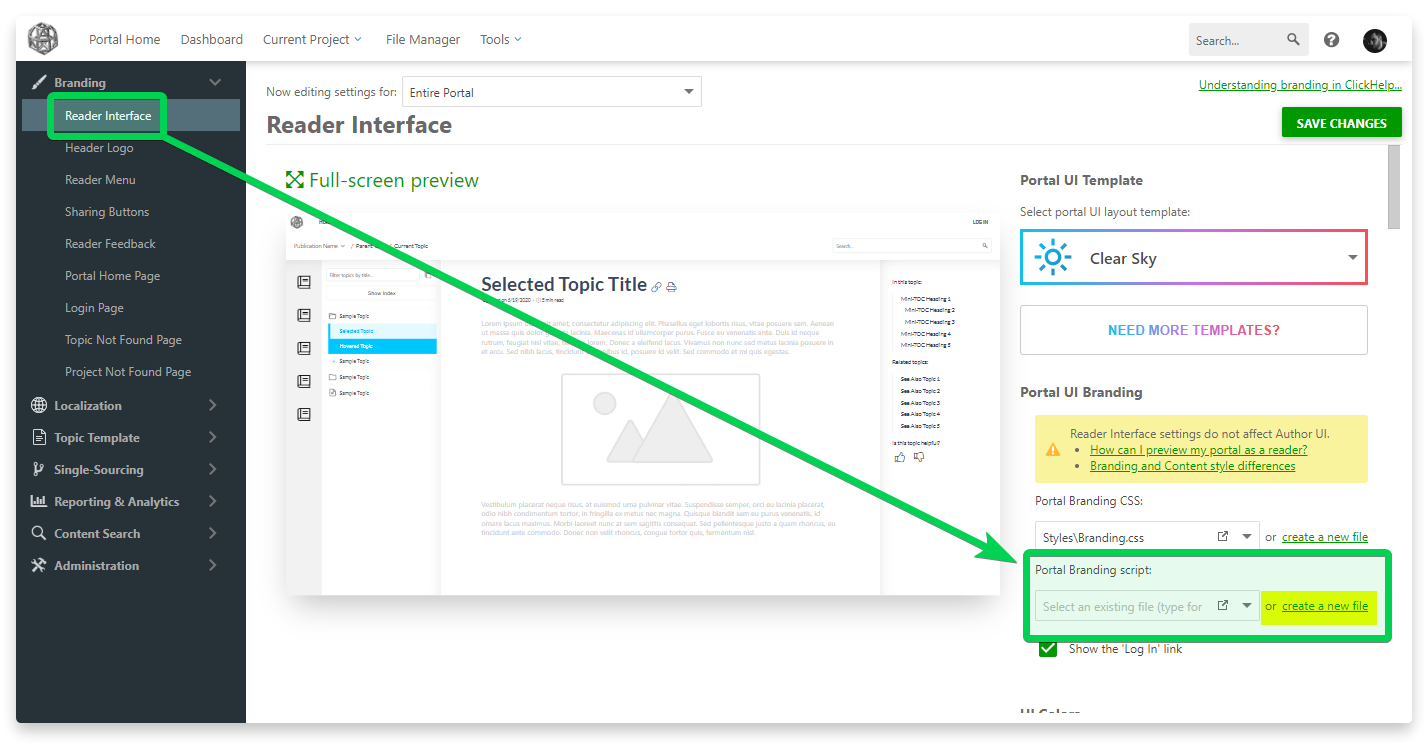
-
Once the new script file is created, it opens in a new browser tab. Click Lock&Edit, delete the default file content, and copy&paste the following code there:
JavaScriptfunction redirectHome() { if ((window.location.pathname == '/') || (window.location.pathname.indexOf('/home') == 0)) { // Put the needed URL here in single quotes window.location.href = 'https://clickhelp.com/'; } } redirectHome();
-
In the code, you'll need to put your publication URL in this line instead of our web site URL:
JavaScriptwindow.location.href = 'https://clickhelp.com/';
Once you save the changes, all readers who open the Home Page will be redirected to the publication you specify.

|
Note |
| For authors, who need to log in to the portal, just add "/login" after the portal domain name to go directly to the Login screen instead of the Home page, so the redirection does not happen. | |
Redirect from the Home Page to the Login page
If you want to set up a redirect from the Home Page to the Login page for all unauthenticated users, the script above won't work. It will redirect all users to the Login page — anonymous and already logged-in users. Use the following script instead:
JavaScript |
function redirectHome() { if ((window.location.pathname != '/') && (window.location.pathname.indexOf('/home') != 0)) return; if (window.document.getElementsByClassName("CHUserProfileLink").length > 0) return; if (window.document.getElementsByClassName("Home_customContent").length == 0) { setTimeout(redirectHome, 500); return; } window.location.href = '/login'; } setTimeout(redirectHome, 500); |
When applied, this script will redirect all anonymous users from the Portal Home page to the Login page and will not affect authenticated users.