To get your portal's Home Page link, do the following:
- Go to Settings → Look & feel → Portal home page.
- Hover the mouse over the portal home page on the base language or another language that you need.
- Click the “View published version“ button.
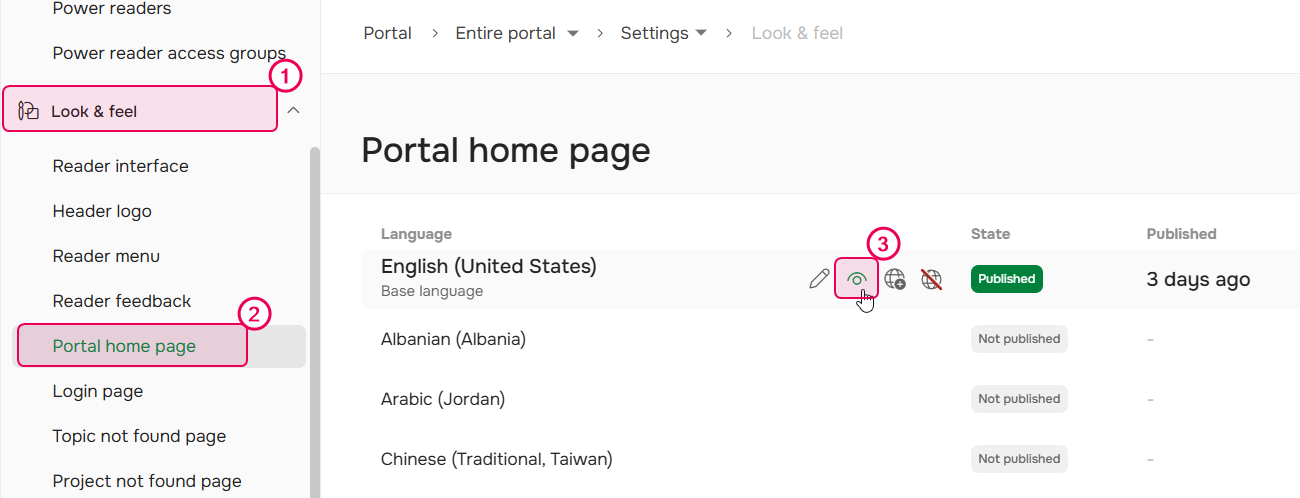
- You'll be redirected to the portal home page. Then, copy the URL from the browser address bar.
Home page example URL: https://docs.hedronlabs.org/home/en-us/
Alternatively, you can supply readers with just the domain name, which might be much easier to remember — for example, docs.hedronlabs.org, in this case — the result will be the same.
If you don't want people visiting the Home Page, you can set up a redirect to any other URL. Learn how to do this from our Knowledge Base article: Redirect from the home page to a specific URL.