In ClickHelp, you don't need to republish the whole project if you need to update a few topics that were rewritten or improved. You can use the Partial Update publishing mode for this. The idea of this mode is to push the latest content to some of the topics without changing those topics that are not ready yet.
Below, you'll find the steps to publish the updated topics only:
-
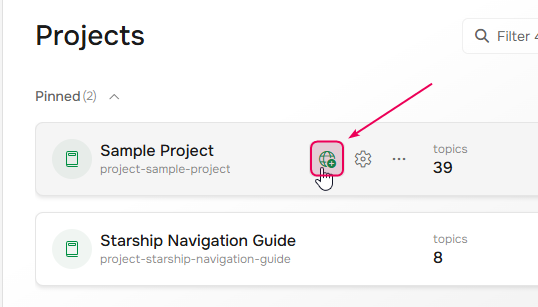
First of all, hover over the needed project on the Projects page and click the Publish button.
-
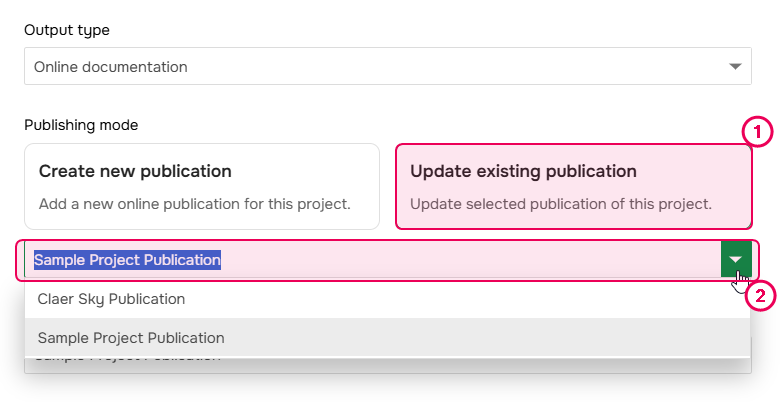
When the Publishing wizard opens, select the Publishing mode and pick the publication you want to update with the latest content.
- Ensure the publication visibility is set correctly.
- If you use conditional content, make sure the necessary output tags are selected.
- Typically, you will also enable the Publish only Ready topics option since you'd like to update only those topics that are in the Ready status at the moment and keep other topics untouched.
- Click Next.
-
On the second step, select the Partial update mode.
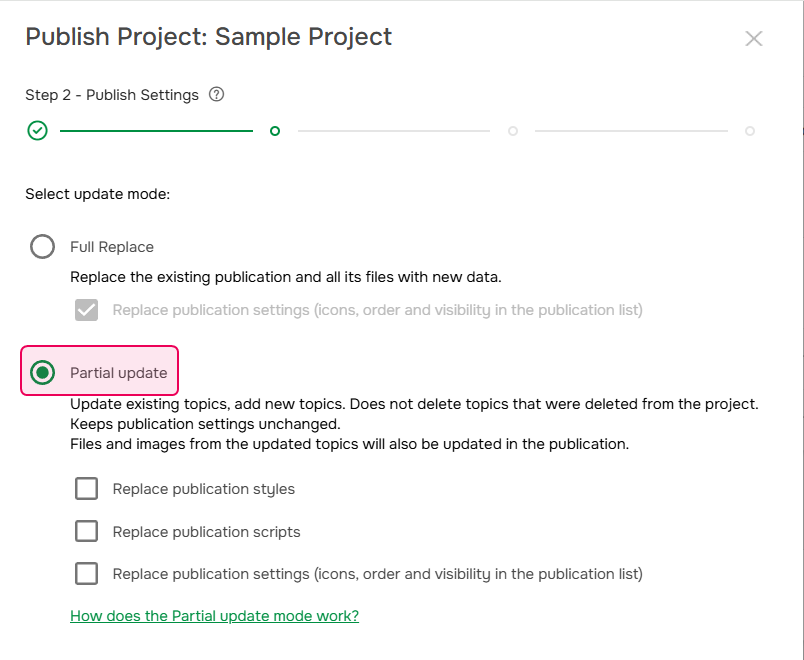
- By default, only the topics' content will be updated; styles, scripts, and publication settings will remain the same. If you need to update styles, scripts and publication settings of the publication with the latest changes from the project, enable the relevant options in the wizard.
- Click Next and wait for the process to complete.
This publishing process will affect only the topics you selected for updating (typically, the Ready topics of your project):
- Topics that already exist in the target publication (previously published), will be updated with the latest content.
- Topics that do not exist in the target publication but need to be published, will be added to the target publication according to their current TOC position.
- Topics that exist in the target publication, but are not selected for publishing (because of status, or output tags selection), will not change in the publication.
- If some topic was published previously, but now it's missing from the project (was deleted), its published version will remain in the publication.
To learn more on the TOC update algorithm used in this mode, refer to this topic: Partial Update - TOC Update Algorithm.
Such publication settings as master page, reader UI settings, TOC settings, etc. will not be updated in this mode. To update them, use the Full replace mode.