This topic explains how to unpublish a topic. There are two ways to do this:
Option 1: Delete a Topic from a Publication Directly
To use this approach, edit the publication directly. This does not change the structure of the underlying project.
Do the following:
- On the Projects page, choose and click a publication. It will open in the Reader Preview mode.
-
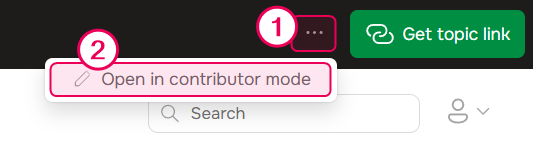
Switch to the contributor mode. To do this, click the ellipsis button in the application's top-right corner and select Open in contributor mode.
- Right-click a topic node in the TOC and use the Delete option from the drop-down menu to delete the topic.
The topic will be deleted from the current publication but will remain in the project.
| If later you publish your full project, the topic will appear in the publication again. |
Option 2: Update a Publication
Another way to unpublish a topic is to modify your project and update the publication in Full Replace mode. The steps you take depend on whether you still need the topic inside the project.
You don't need this topic in a project
In this case, delete the topic from your project and update the publication in Full Replace mode.
Do the following:
- Open your project.
- Right-click a topic node in the TOC and use the Delete option from the drop-down menu to delete the topic.
- Update a publication in Full Replace mode.
This deletes the topic from the project and from the publication permanently.
You need this topic in a project but don't want to publish it
There are two ways to achieve this.
Change the topic's publishing properties
- Select the do not publish option in the topic's publishing properties.
- Update a publication in Full Replace mode.
This way the topic will remain in the project and you will be able to reuse it. It will not appear in your publications as a separate topic.
Manually select topics to publish
- Manually select topics to publish, keeping the topics you need to exclude from the publication unchecked.
- Update a publication in Full Replace mode.
In this case, only the topics you select will be published. The ones not selected will not be included in the publication.